You can activate and install your iZotope Plus / Pro subscription with Native Access.
Please follow these steps:
- Download and install Native Access and log in with your Native ID.
- Open the Subscriptions tab and install your products:
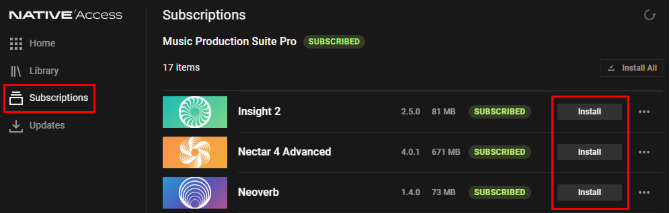
- Open your DAW and rescan for plug-ins to get started.
What happened to Product Portal?
As of April 30, 2025, Native Access is the new, centralized hub to manage products in your subscription.
I don't see my products in Native Access
- Make sure you're logged in with the correct Native ID (email address).
- Click the refresh button in the upper right of Native Access:

- Restart your computer.