Maschine 3 supports HiDPI modes, both as a plug-in and as a host of plug-ins. However, not every DAW has the same default handling behavior, particularly on Windows. Hosted plug-ins may look broken if this behavior is not configured correctly.
If you’re using Maschine 3 as VST3 plug-in on Windows in any of the following DAWs, please ensure you follow these set-up steps:
TABLE OF CONTENTS
Ableton Live 10-12
- Start Live and open your plug-in list in Live's browser.
- Right-click Maschine 3 and de-select "Auto-Scale Plug-in Window".
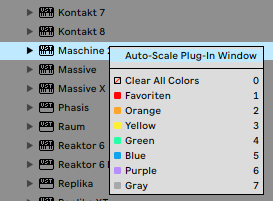
- Save your set and restart Live.
Maschine 3 will now display as intended in all future Ableton Live sets. For reference: Ableton Live documentation link.
FL Studio
By default, FL Studio should be configured correctly to display Maschine 3. However, if you are experiencing issues displaying Maschine 3 or plug-ins hosted inside Maschine, please ensure the following setting is turned on:
- Start FL Studio and load Maschine 3 as a plug-in.
- Open the VST Wrapper settings for the Maschine 3 plug-in.
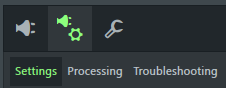
- Under GUI, ensure that the option DPI aware is activated.
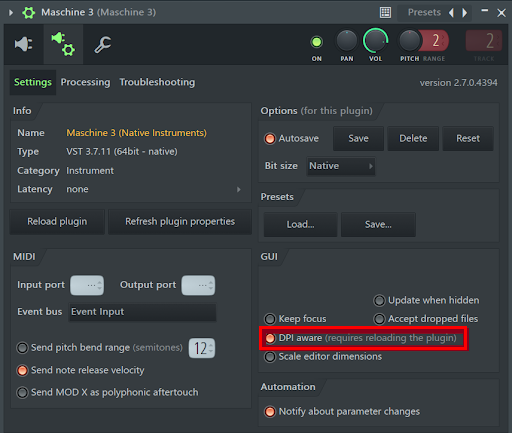
- Save your project and re-start FL Studio.
Maschine 3 will now display as intended in all future FL Studio projects.
Cubase
- The default should work correctly.
- Please don’t override high DPI settings through the Windows application properties as this will cause scaling issues.
Pro Tools
- Use Pro Tools 2024.6 or earlier for full compatibility on Windows. 2024.10 introduced scaling issues that affect hosting plugins inside Maschine.
- The default should work correctly.
- Please don’t override high DPI settings through the Windows application properties as this will cause scaling issues.