Maschine | iZotope Neutron 4 Does Not Appear in KOMPLETE KONTROL or MASCHINE
TABLE OF CONTENTS
Symptom
iZotope Neutron 4 is not available in the KOMPLETE KONTROL or MASCHINE presets browser.
Cause
The Neutron 4 presets are not yet available in the NI NKS preset format.
Solutions
The Neutron 4 VST3 plug-ins can be loaded directly in the KOMPLETE KONTROL and MASCHINE FX plug-in menus. Please follow these steps for KOMPLETE KONTROL and MASCHINE.
KOMPLETE KONTROL
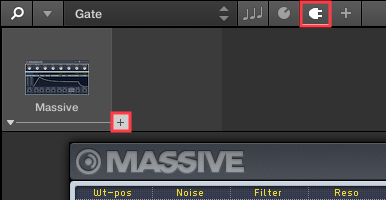
- After loading an instrument preset in KOMPLETE KONTROL, select the Plug-in icon in the header and click the "+" icon to the right of the instrument slot.
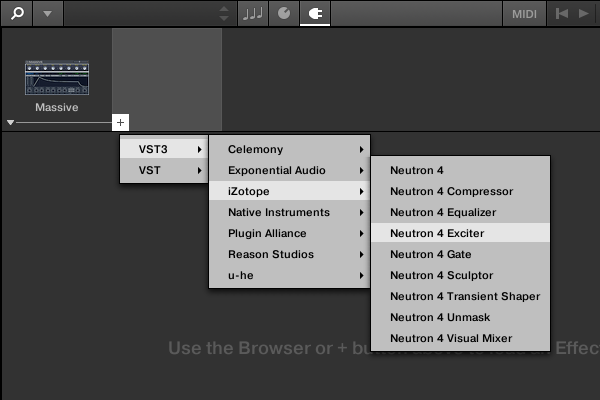
- Select VST3 > iZotope and choose a Neutron 4 plug-in.
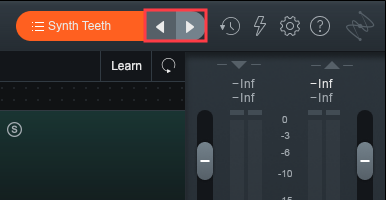
- Use the Neutron GUI to load a preset.
MASCHINE
- After loading an instrument preset in MASCHINE, click the Plug-in icon and select *SOUND.
- Click the "+" icon to access the FX plug-in menu.
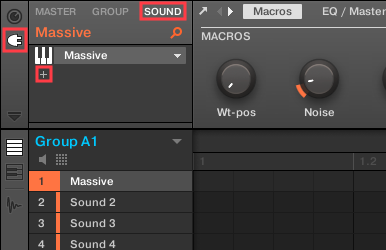
*Note: Effects plug-ins can also be applied to the MASCHINE GROUP and MASTER channels.
- Select VST3 > iZotope and choose a Neutron 4 plug-in.
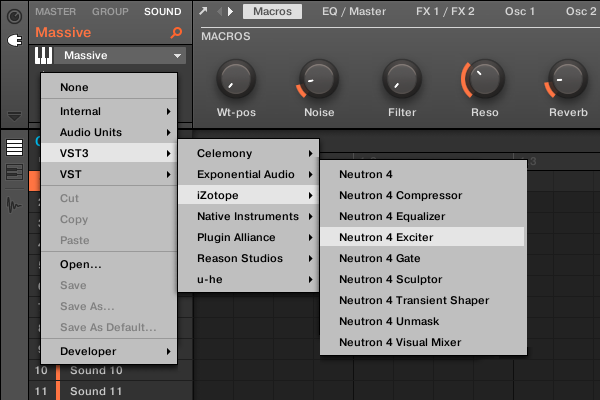
Note: macOS users can also load Neutron 4 from the Audio Units > iZotope menu.
- Use the Neutron GUI to load a preset.