Logic Pro Error Message: "Plug-in for device Komplete Kontrol / Maschine is missing"
Symptom
When you start Logic Pro, you receive the following error message for Komplete Kontrol or Maschine:
Plug-in for device "Komplete Kontrol S-Series" is missing or
Plug-in for device "Maschine MK3" is missing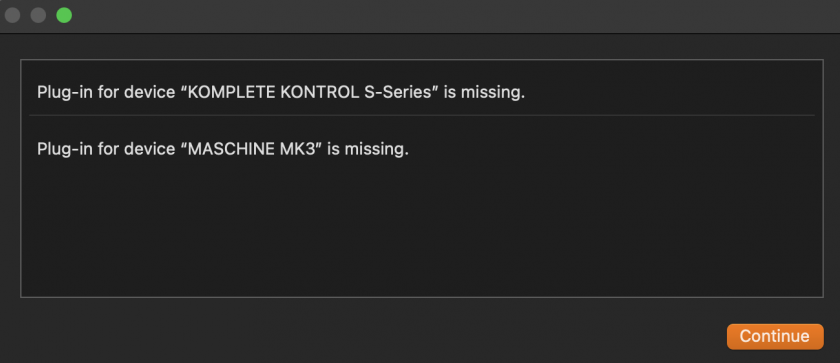
Solution
- Quit Logic Pro and open Finder.
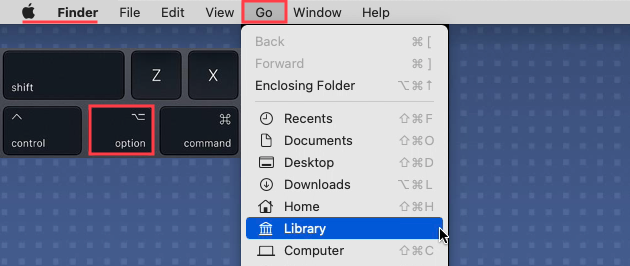
- Open the User Library: Click Go in the menu bar, hold down the Option / Alt key and select Library from the menu:
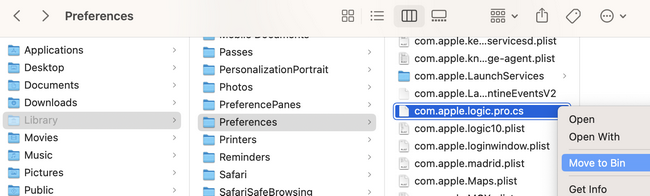
- Navigate to Library > Preferences.
- Delete the file com.apple.logic.pro.cs
- Start Logic Pro.
Logic should start as expected now.