My Kontakt library is displayed in Kontakt 7/8 'Classic View' but is missing in 'Default View'
Symptom:
A Kontakt library is displayed in 'Classic View' of Kontakt 7 or 8, but is missing in 'Default View'.
Solution:
Please reset Kontakt's database to solve the issue:
On macOS:
- Close Kontakt and all other audio apps.
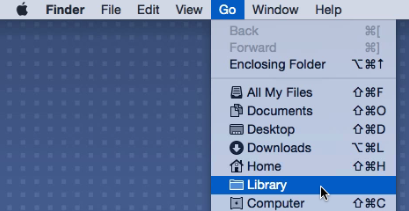
- Hold down the alt key on your computer's keyboard and click Go in the Finder menu bar. Choose the appearing Library entry in the drop-down menu.
- Navigate to Application Support > Native Instruments > Native Instruments > Kontakt 7 / 8
- Rename the file komplete.db3 (for example to 'OLD_komplete.db3').
- Start Kontakt standalone (not in your DAW).
- Wait for Kontakt to update its database - this can take a few minutes. Once finished, all libraries should display correctly again.
On Windows:
- Close Kontakt and all other audio apps.
- Click on the Windows start button on the bottom left of your screen.
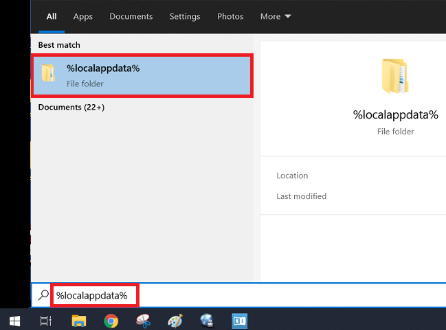
- CType "%localappdata%" and click the option that appears.
- From there, navigate to Native Instruments > Kontakt 7 / 8
- Rename the file komplete.db3 (for example to 'OLD_komplete.db3').
- Start Kontakt standalone (not in your DAW).
- Wait for Kontakt to update its database - this can take a few minutes. Once finished, all libraries should display correctly again.