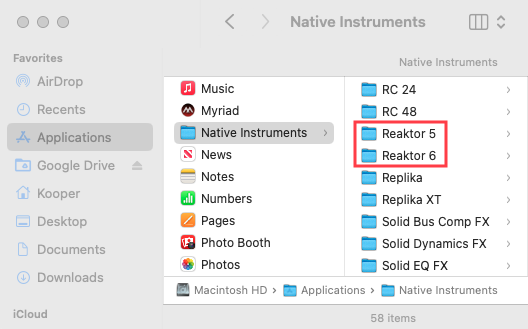
When installing a major Native Instruments update (e.g., upgrading from one full version to another), the new version is installed alongside the existing version rather than replacing it.
TABLE OF CONTENTS
- How Major Updates Work
- Should I keep the older plug-in version on my computer?
- Can I transfer my edited presets to the new plug-in version?
How Major Updates Work
When installing a major NI product update to your computer (e.g. updating from REAKTOR 5 to REAKTOR 6), the new version of the software will not overwrite the previous one. Both versions are installed side-by-side in your Native Instruments Application and Plug-in folders.
Note: This applies only to paid updates (e.g. from version 5 to version 6). Incremental updates (e.g. version 6.1, 6.2, 6.3, etc.) are free. Please see this article for more details on free vs. paid updates.
Should I keep the older plug-in version on my computer?
If you are still working on existing DAW projects that used the older version of the plug-in, you would need to keep that previous version of the NI product installed.
If the older version (e.g. REAKTOR 5) is uninstalled, your DAW will report that the older plug-in is missing the next time the project opens.
Can I transfer my edited presets to the new plug-in version?
You can save your sound and replace the older plug-in with the new version (e.g. REAKTOR 6) in your DAW project. Please see this article for a tutorial guide.
When is it safe to uninstall the old version of the plug-in?
Once you have replaced the older plug-in version in all of your DAW projects that used it, you could then remove the old version from your computer.