Kontakt 8 | Why Is the Leap Category Missing From the Browser?

If you have recently updated Kontakt 8 and can no longer find the dedicated Leap category in the browser, this is an expected change beginning with Kontakt 8.14.0 and does not indicate a problem with your Kontakt installation.
This guide explains what changed, where to find your Leap content, how to check the Kontakt release notes, how to create a new Leap preset, and the available option if you prefer the previous browser layout
TABLE OF CONTENTS
- What Changed in Kontakt 8.14?
- How to Check Kontakt Release Notes
- Where Can I Find My Leap Content?
- Can I Filter the Browser to Show Only Leap Libraries?
- Can I Restore the Dedicated Leap Category?
- Summary
What Changed in Kontakt 8.14?
In Kontakt 8.13.1 and earlier, Leap appeared as its own dedicated category within the Kontakt browser.
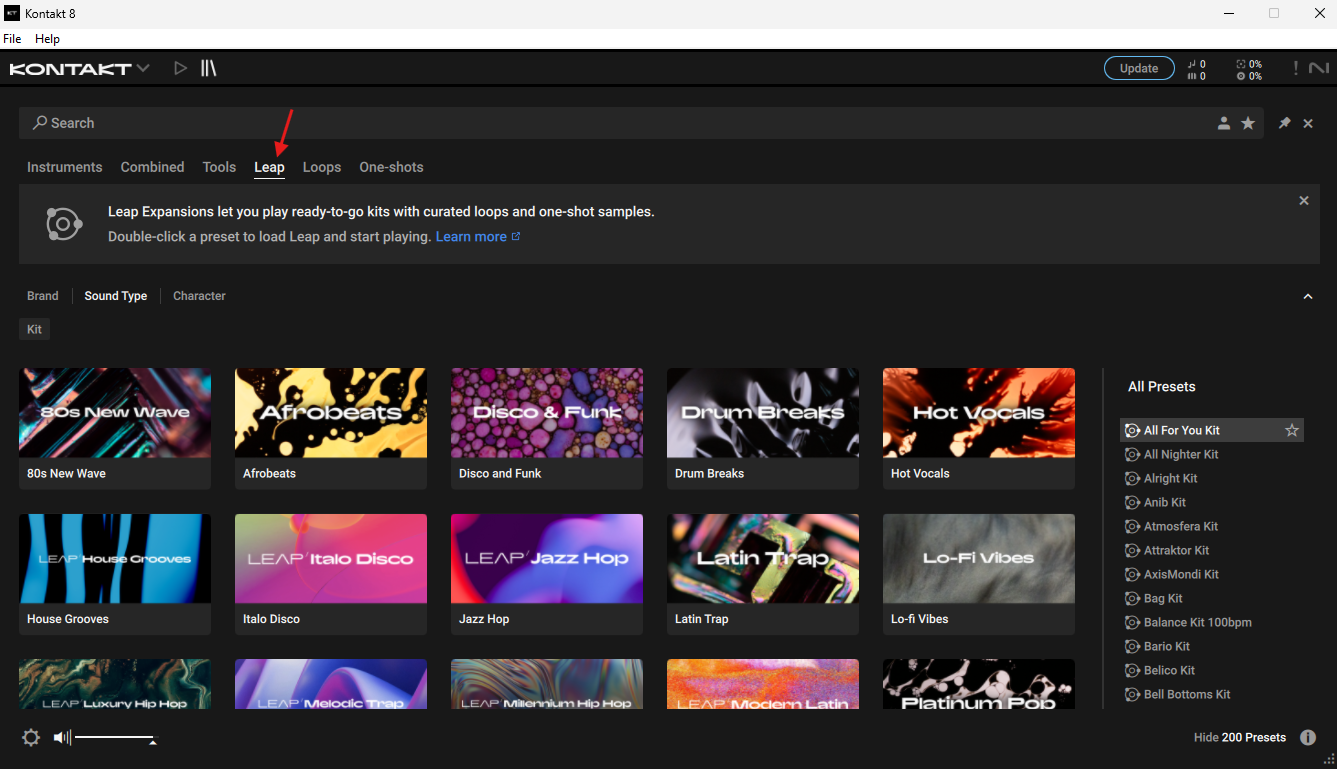
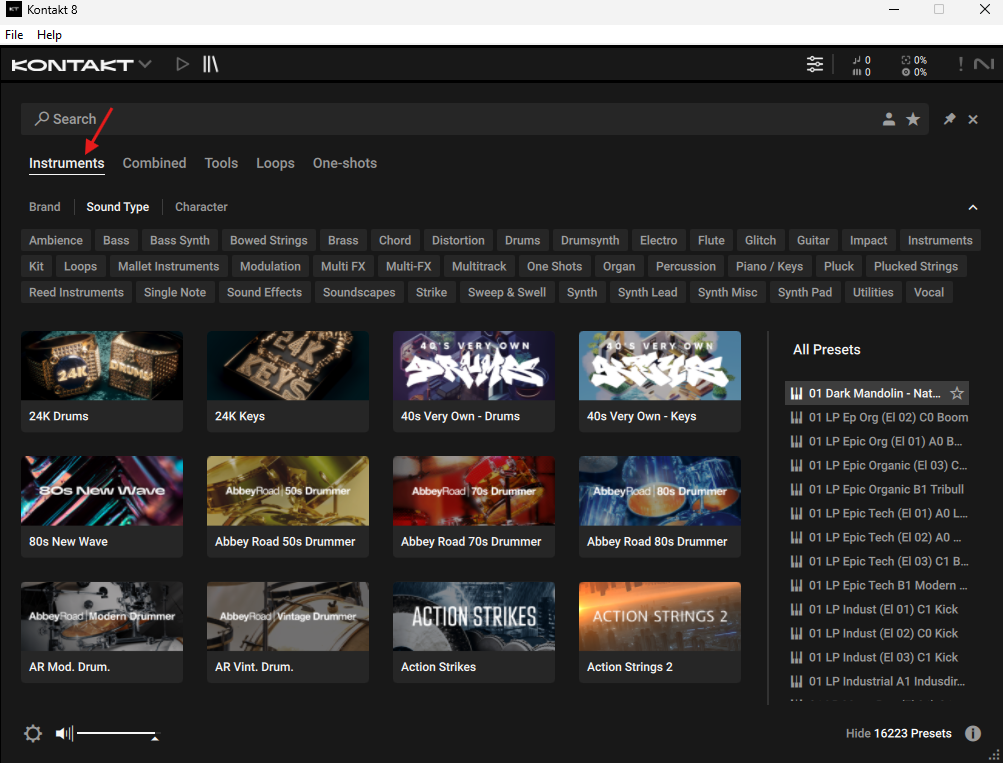
Begining with Kontakt 8.14.0 onward, this dedicated category was removed. Leap content appears within the Instruments section alongside other Kontakt content.
This means that after updating, you may see categories such as:
- Instruments
- Combined
- Tools
- Loops
- One-shots
but no longer see Leap as a separate browser category.
This is expected behaviour and does not mean that your Leap content has been removed.
How to Check Kontakt Release Notes
The removal of the dedicated Leap browser category was documented within the release notes for the relevant Kontakt update.
Release notes for newer and previous versions of Kontakt can be viewed directly within Native Access, allowing you to review changes, improvements, fixes, and other adjustments introduced with different versions.
To view the Kontakt release notes:
- Open Native Access.
- Locate Kontakt 8.
- Click the three dots (...) next to Kontakt 8.
- Select Release notes.
- You can then review the available release information for different versions of Kontakt.
Where Can I Find My Leap Content?
If you are using Kontakt 8.14.0 or later:
- Open Kontakt.
- Make sure you are using the default browser view.
- Select Instruments.
- Browse your installed Kontakt content.
- Your installed Leap libraries can be accessed from within the Instruments section.
Can I Filter the Browser to Show Only Leap Libraries?
There is currently no dedicated filter within Kontakt 8 for displaying only Leap libraries. This means that the search field should not be considered a direct replacement for the dedicated Leap category available in earlier versions.
We understand that a dedicated filter would make it easier to quickly locate and browse Leap-specific content. A feature request is currently in place for a dedicated Leap filter to be added to Kontakt in a future update.
While we cannot provide a timeframe or guarantee when or if this functionality will be introduced, the request has been passed to the relevant team for consideration
Can I Restore the Dedicated Leap Category?
If having a separate Leap category is important to your workflow, a temporary option is to return to Kontakt 8.13.1, where the dedicated Leap category is still available.
Older Kontakt installers can be accessed from your Native Instruments Profile under the Product Downloads section.
Downgrading should only be considered if access to the older dedicated Leap category is essential to your workflow. Moving back to an earlier version also means you will not have changes and improvements introduced in newer Kontakt releases.
Summary
If you have updated Kontakt and noticed that Leap has disappeared from the browser header, this is expected from Kontakt 8.14.0 onward.
- Kontakt 8.13.1 and earlier: Dedicated Leap category is available.
- Kontakt 8.14.0 and later: Dedicated Leap category is no longer displayed.
- Existing Leap content can be accessed through Instruments.
- If the older browser organisation is essential, Kontakt 8.13.1 can temporarily be used instead.