My Arturia Plug-ins Are Missing in the Komplete Kontrol / Maschine Browser
Symptom:
Although the Arturia plug-ins are installed and listed in Komplete Kontrol / Maschine under Preferences > Plug-ins, the products are not displayed in the Komplete Kontrol / Maschine browser.
Cause:
It is likely that the NKS resources haven't been installed in the Arturia Software Center.
Solution:
Reinstall the Arturia plug-ins including all 3rd party resources:
- Close all audio applications.
- Start Arturia Software Center and log in.
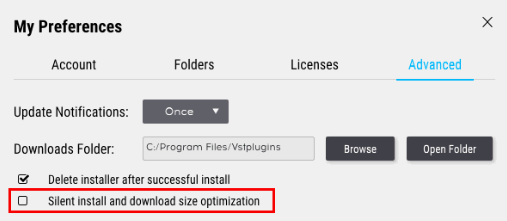
- Open Preferences > Advanced.
- Uncheck the option Silent install and download size optimization.
- Uninstall the affected plug-ins from the My Products tab.
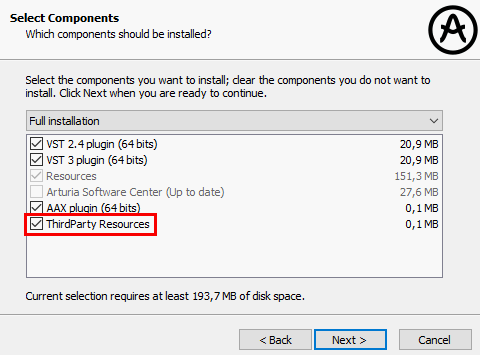
- Start the installation of one of the plug-ins. Make sure to activate the option ThirdParty Resources during the process. Also check whether you have ticked all the plug-in formats you want to install:
- After the installation, you can reactivate the Silent Install option in the Preferences again and install the rest of your plug-ins.
If the issue persists, please follow the steps in these articles: